Projects
Projects lists the projects that exist only in Time-it, which people can log time against. These projects live in Time-it. They are separate from projects in SUM-IT, even though you can also book hours on SUM-IT projects from Log Time when your organization uses both.
Time-it projects vs SUM-IT projects
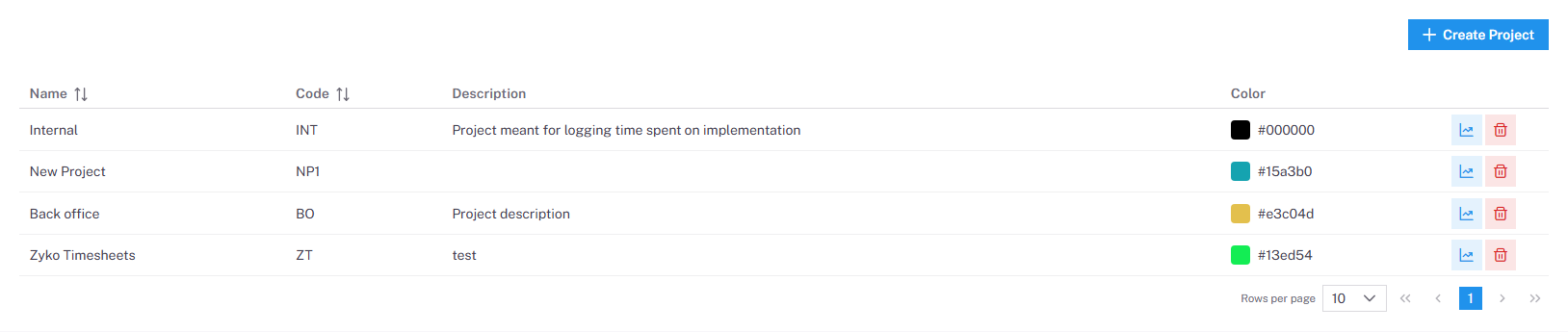
- Time-it projects appear on this Projects menu. You create them here, give them a Name, Code, Description, and Color, then manage tasks and members on the project dashboard.
- SUM-IT projects are managed in SUM-IT. They show up in Log Time (with an SM badge) when you are allowed to book them. They do not appear as rows on the Time-it Projects list.
Use Time-it projects for work that is not a SUM-IT project, for example internal meetings, office work, or holidays. Use SUM-IT projects when the hours should stay tied to a SUM-IT project and later support the daily report.
Who can open this menu
The Projects menu needs the Time-it Projects View permission. Creating, editing, and deleting projects needs Projects Edit.
Actions
- Click Create Project to add a Time-it project (Name and Code are required).
- Click the chart icon on a project's row to open its dashboard. There you manage its tasks and members, and change its name or colour with the pencil icon.
- Click the bin icon on a project's row to delete it.
People normally need to be members of a Time-it project before they can log time on it. You can also turn on Open project on the Members tab so any user can book that project. SUM-IT booking still needs SUM-IT project membership. See Project dashboard.